Get ahead
VMware offers training and certification to turbo-charge your progress.
Learn moreTool calling — the ability for an AI model to invoke application-defined functions and act on the results — is the essential building block of agentic AI systems.
 A model that can discover information, take action, and loop until a goal is reached is an agent.
Spring AI 2.0 rearchitects tool calling from the ground up. In 1.x, each chat model implementation contained its own private tool execution loop — functional, but buried. There was no way to hook into it, observe intermediate steps, or compose it with other behaviors. You could call tools; you could not build on top of tool calling.
2.0 lifts the tool loop into the advisor chain as a first-class, composable component. ChatClient runs every request through an ordered chain of advisors and supports looping, letting an advisor re-enter the downstream chain. The same mechanism drives tool-call loops, structured-output retry loops, and evaluation loops alike.
The simplest way to define a tool is the @Tool annotation on any method:
class WeatherTools {

    @Tool(description = "Get the current weather for a given city")
    public String getWeather(String city) {
        return weatherService.fetch(city);
    }

    @Tool(description = "Book a flight between two cities on a given date")
    public BookingConfirmation bookFlight(
            String origin,
            String destination,
            @ToolParam(description = "Date in YYYY-MM-DD format") String date) {
        return flightService.book(origin, destination, date);
    }
}
Spring AI generates the JSON schema for input parameters automatically. @ToolParam adds per-parameter descriptions and optional/required hints. Parameters annotated with @Nullable are treated as optional by default.
Tools are passed explicitly to ChatClient via .tools():
String response = ChatClient.create(chatModel)
    .prompt("What's the weather in Amsterdam? Book a flight from London if it's sunny.")
    .tools(new WeatherTools())
    .call()
    .content();
The reference documentation covers all tool definition options in detail, including programmatic MethodToolCallback and FunctionToolCallback APIs.
ToolCallingAdvisorToolCallingAdvisor is a recursive advisor — an advisor that re-enters the downstream chain repeatedly until a stop condition is met. In this case, the stop condition is the model producing a response with no tool calls. DefaultChatClient automatically adds it to the advisor chain — exactly one ToolAdvisor may be present at any time — and from that point on it owns the complete tool execution lifecycle:
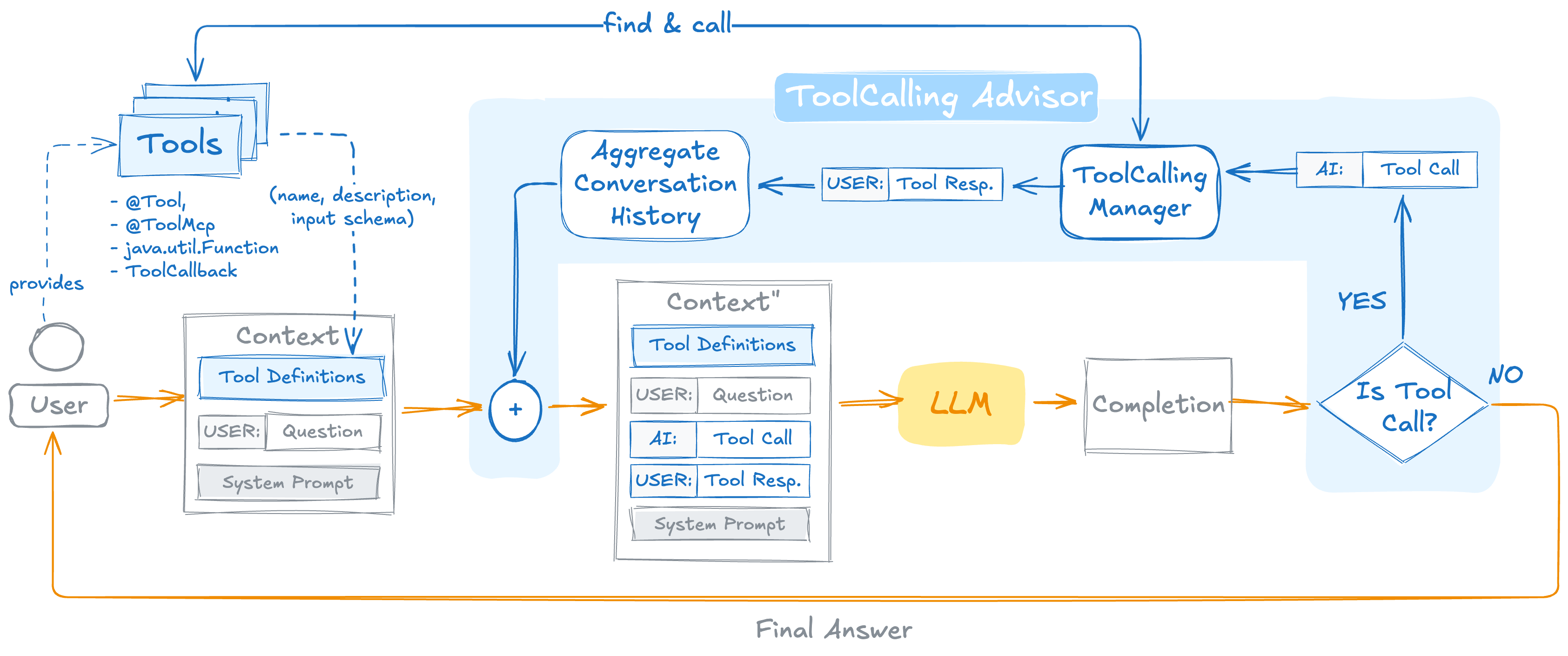
Tools are defined via @Tool, @McpTool1, java.util.Function, or ToolCallback — the advisor extracts their name, description, and input schema and injects the resulting Tool Definitions into the initial context alongside the user's question and system prompt.
On each iteration, the accumulated Conversation History (user messages, AI tool call requests, and tool responses from previous rounds) is merged with the current context and sent to the LLM. The LLM produces a completion, which the advisor inspects:
ToolCallingManager finds and executes the referenced tools, appends the tool responses to the conversation history, and loops back.Both blocking (.call()) and streaming (.stream()) modes are fully supported.
Where an advisor sits relative to ToolCallingAdvisor (default order HIGHEST_PRECEDENCE + 300) determines whether it sees only the final result (outside) or every iteration (inside) — the next section shows this with memory.
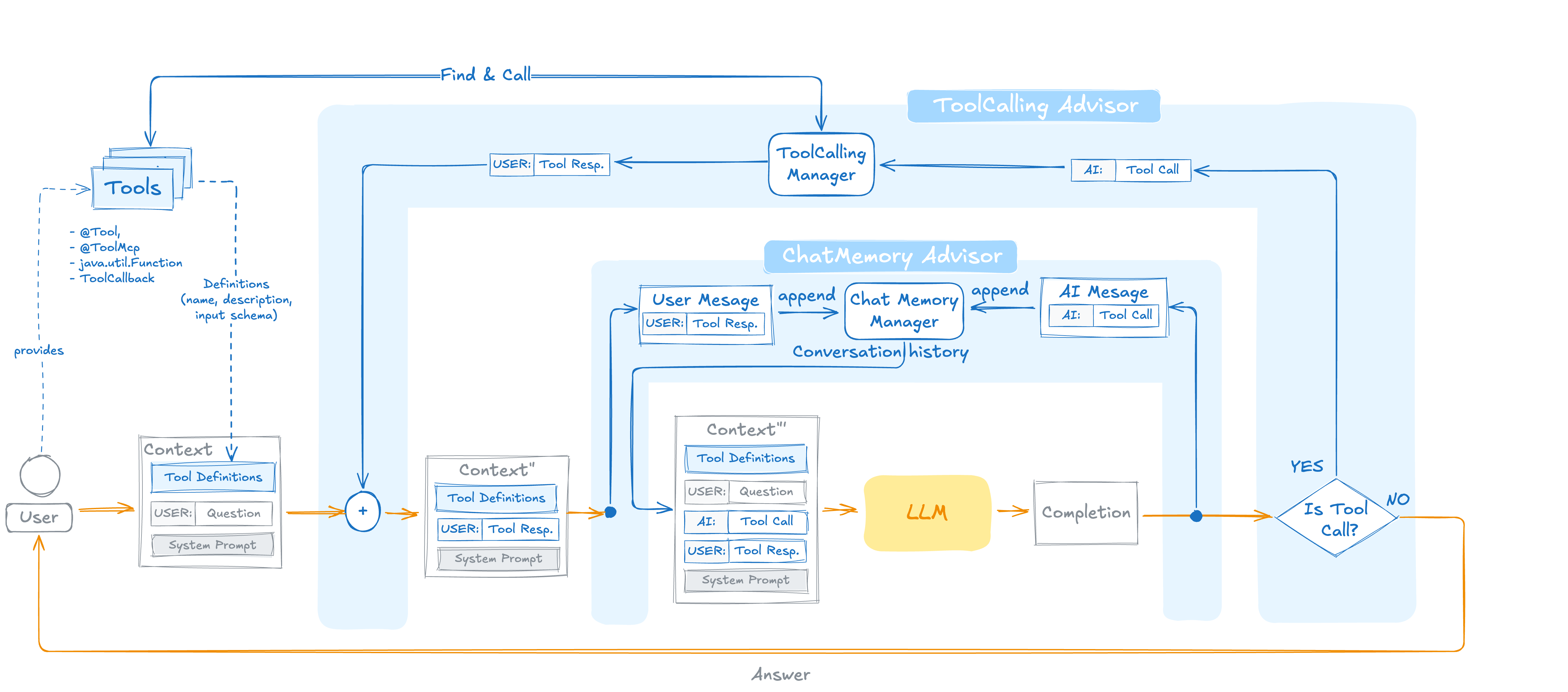
Where you place MessageChatMemoryAdvisor relative to ToolCallingAdvisor determines how much conversation context the memory store captures.
Outside the loop (default — order HIGHEST_PRECEDENCE + 200): the memory advisor loads history once before the loop starts and persists only the final user and assistant messages. Tool request and response messages are not written to the store. This is safe for every ChatMemoryRepository implementation, and matches the behavior of Spring AI 1.x, where the tool loop ran inside the chat model and memory had no way to observe tool messages.
Inside the loop (order greater than ToolCallingAdvisor.DEFAULT_ORDER): the memory advisor is invoked on every iteration, persisting the full tool request/response transcript. This gives the LLM richer context on subsequent turns — it can reason about what was already tried, which tools were called, and what they returned.
To avoid duplicate writes, ToolCallingAdvisor's internal conversation history must be disabled when a memory advisor sits inside the loop. With the auto-registered ToolCallingAdvisor, this is automatic — DefaultChatClient detects any MemoryAdvisor placed inside the loop and disables internal history with no additional configuration. If you construct a ToolCallingAdvisor manually, call .disableInternalConversationHistory() on the builder yourself.
Not every ChatMemoryRepository can persist tool messages. The repository has to know how to serialize ToolResponseMessage and tool call requests alongside ordinary user and assistant turns — and most current implementations only model the latter. As of 2.0, the built-in repositories that support the full message set are InMemoryChatMemoryRepository, RedisChatMemoryRepository, and Neo4jChatMemoryRepository — any of them is safe inside the loop.
For JDBC-backed persistence with full tool-message support — plus event-sourced history, turn-aware compaction, and multi-agent branch isolation — use the new Spring-AI-Session community project. It is designed for exactly this scenario and is planned for inclusion in Spring AI 2.1.
ToolSearchToolCallingAdvisor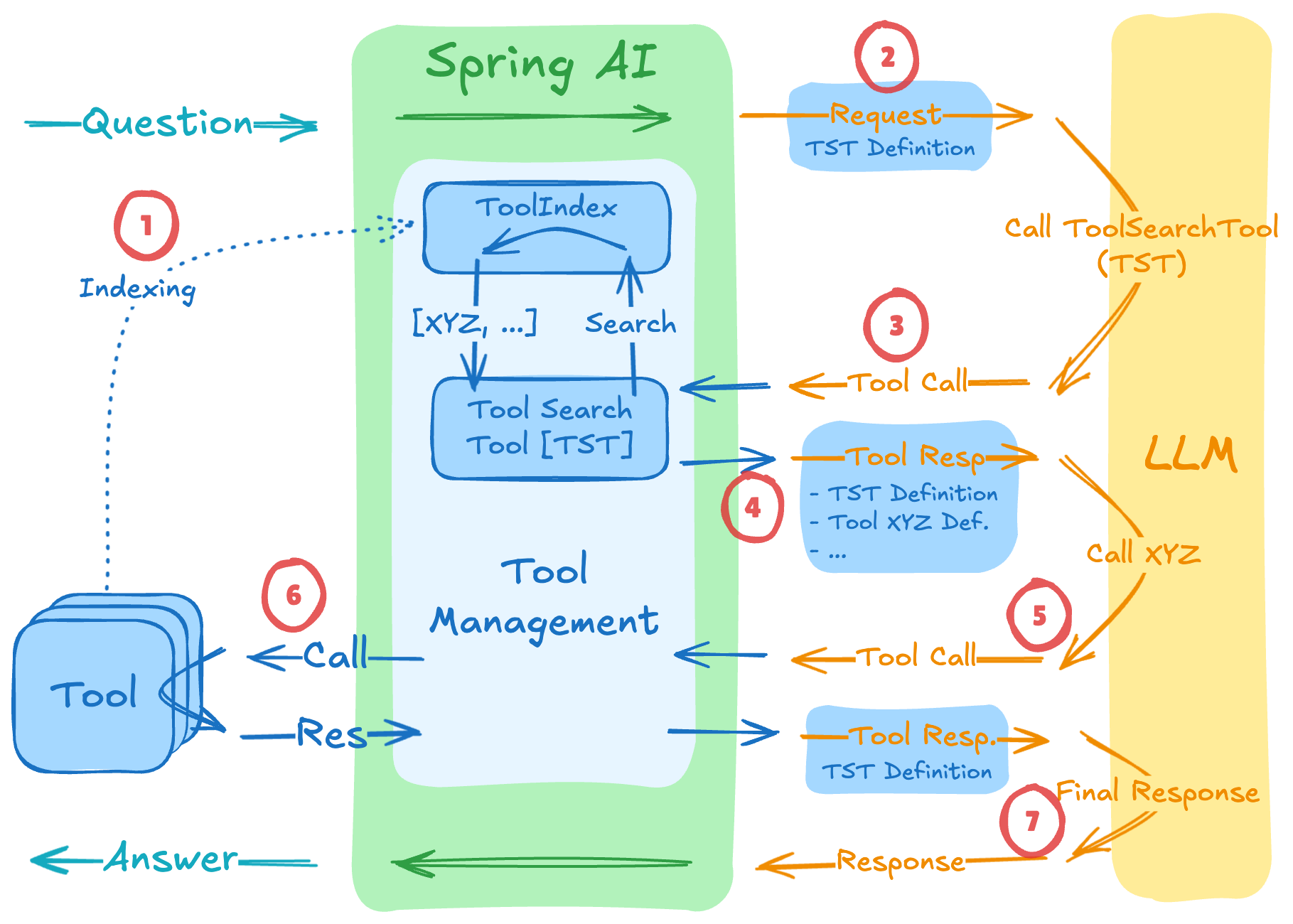
The standard ToolCallingAdvisor sends all registered tool definitions to the model on every request. With a small tool library that's fine. At 30+ tools — or in multi-server MCP setups where a single session may aggregate hundreds of tool definitions — it creates context bloat, accuracy degradation, and unnecessary token cost.
ToolSearchToolCallingAdvisor is a drop-in replacement for ToolCallingAdvisor that implements the progressive tool disclosure pattern: rather than sending every tool definition upfront, it exposes tools to the model incrementally on demand. At session start it indexes the full tool set; on each iteration it injects only a built-in toolSearchTool the model uses to retrieve relevant tools by natural language query. Only discovered tools are included in subsequent requests.
Enable it via auto-configuration with a single property:
spring.ai.chat.client.tool-search-advisor.enabled=true
spring.ai.chat.client.tool-search-advisor.tool-index-type=vector  # regex (default), lucene, or vector
Because the tool index is scoped per session, the caller must supply a session ID with every request — the advisor uses it to isolate indexes between conversations and tenants. By default the session ID is read from ChatMemory.CONVERSATION_ID in the advisor context:
chatClient.prompt()
    .advisors(a -> a.param(ChatMemory.CONVERSATION_ID, "user-42-session"))
    .user("Help me plan my trip to Amsterdam")
    .call()
    .content();
The key name is configurable via spring.ai.chat.client.tool-search-advisor.session-id-key-name if you already pass a session identifier under a different name.
Three ToolIndex strategies are available: regex (lightweight, no extra dependencies, default), lucene (keyword search, bundled in the starter), and vector (embedding-based semantic search, requires a VectorStore bean). See the Tool Search Tool reference documentation for the full configuration surface.
Our December 2025 post covers the pattern in depth, including benchmark results showing 34–64% token reduction across OpenAI, Anthropic, and Gemini models, and worked examples of the multi-step discovery flow. The advisor graduated from the community into core Spring AI as part of 2.0.
Spring AI lets you dynamically extend a tool's input schema with additional arguments — without touching the tool implementation. The model sees the augmented schema and fills in the extra fields; your code receives them via a consumer; the original tool receives only its own arguments, unchanged.
The primary use case is inner thinking: forcing the model to articulate its reasoning before executing a tool, which improves traceability and can be stored in long-term memory or used for evaluation.
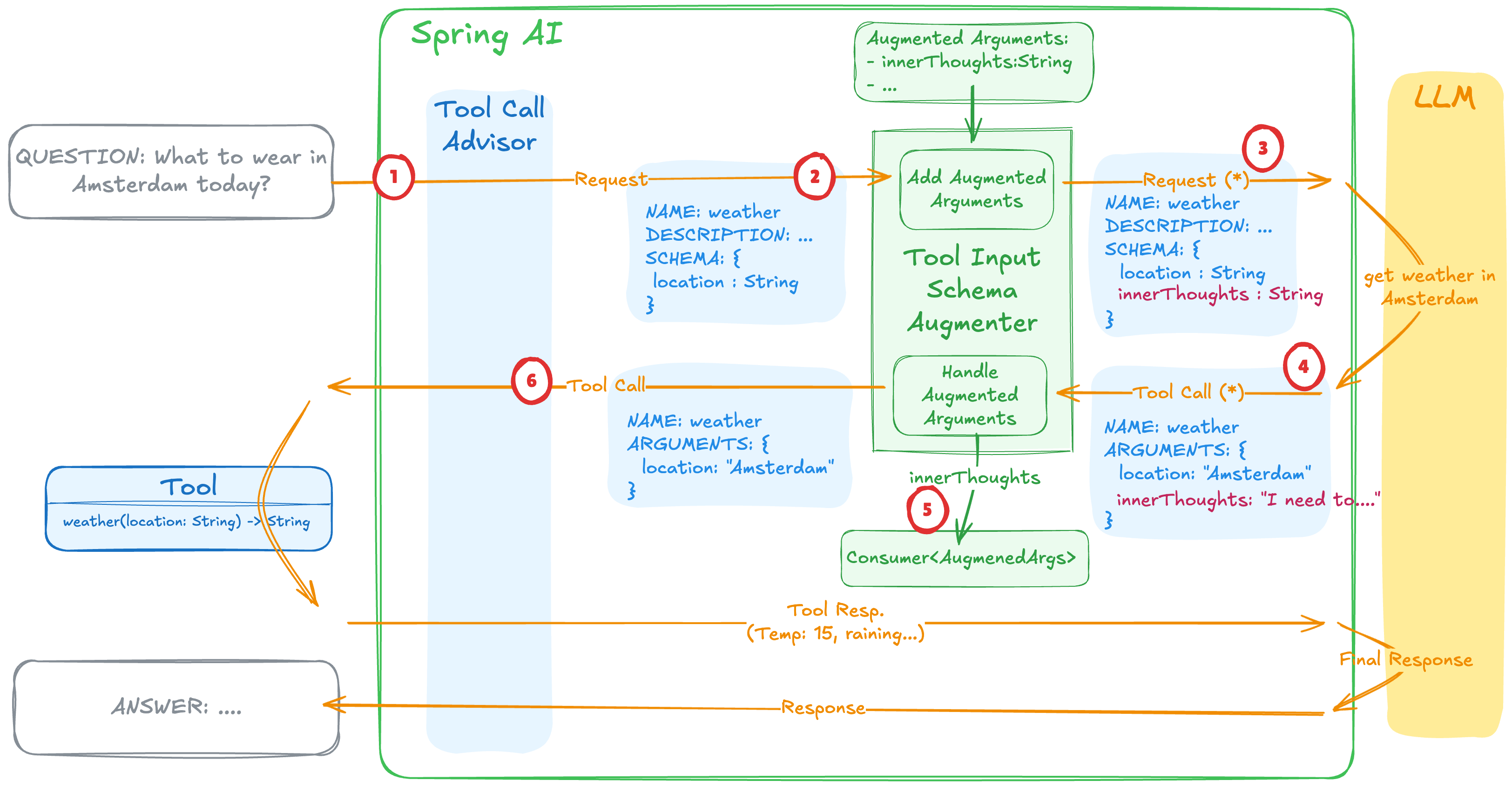
Wrap your tools with AugmentedToolCallbackProvider:
public record AgentThinking(
    @ToolParam(description = "Your reasoning for calling this tool")
    String innerThought) {}

AugmentedToolCallbackProvider<AgentThinking> toolProvider =
    AugmentedToolCallbackProvider.<AgentThinking>builder()
        .toolObject(new WeatherTools())     // wrap the original tools
        .argumentType(AgentThinking.class)  // augmentation schema type
        .argumentConsumer(event -> log.info( // optional consumer of augmented content
            "Tool: {} | Reasoning: {}", event.toolDefinition().name(), event.arguments().innerThought()))
        .build();

ChatClient chatClient = ChatClient.builder(chatModel)
    .defaultTools(toolProvider)
    .build();
See the Tool Argument Augmentation reference for the full API.
MCP (Model Context Protocol) tools integrate with Spring AI's tool calling architecture from both directions: your application can consume tools exposed by remote MCP servers, and it can expose its own Spring-managed tools to MCP clients.
Add the MCP client starter and configure connections to one or more MCP servers in application.properties:
<dependency>
    <groupId>org.springframework.ai</groupId>
    <artifactId>spring-ai-starter-mcp-client</artifactId>
</dependency>
spring.ai.mcp.client.stdio.connections.my-server.command=npx
spring.ai.mcp.client.stdio.connections.my-server.args=-y,@modelcontextprotocol/server-everything
Auto-configuration connects to all configured MCP servers, discovers their tools, and exposes them as a single SyncMcpToolCallbackProvider bean (or AsyncMcpToolCallbackProvider for the async client type). MCP providers are deliberately not auto-registered with the ChatClient — they implement ToolCallbackProvider, but listing tools eagerly would force a network round-trip to every connected MCP server at startup. Instead, you inject the provider and wire it explicitly:
@Autowired SyncMcpToolCallbackProvider mcpTools;

// Once, as default tools for every request
ChatClient chatClient = ChatClient.builder(chatModel)
    .defaultTools(mcpTools)
    .build();

// Or per call
chatClient.prompt()
    .user("Search the web for the latest Spring AI release notes")
    .tools(mcpTools)
    .call()
    .content();
Tool callback auto-configuration is enabled by default and can be turned off with spring.ai.mcp.client.toolcallback.enabled=false. When connecting to multiple MCP servers that may expose tools with the same name, a DefaultMcpToolNamePrefixGenerator is applied automatically to avoid conflicts. See the MCP client reference documentation for the full list of configuration properties, transport options, and tool filtering.
Going the other direction — exposing your Spring beans as MCP tools — is a matter of replacing @Tool with @McpTool and adding the MCP server starter:
<dependency>
    <groupId>org.springframework.ai</groupId>
    <artifactId>spring-ai-starter-mcp-server-webmvc</artifactId>
</dependency>
@Component
public class WeatherTools {

    @McpTool(description = "Get the current weather for a given city")
    public String getWeather(
            @McpToolParam(description = "City name") String city) {
        return weatherService.fetch(city);
    }
}
The MCP server auto-configuration scans for @McpTool-annotated beans, generates JSON schemas for their parameters, and registers them with the MCP server — no additional wiring required.
See the MCP server reference documentation for transport configuration, security, and observability options.
Once registered, local @Tool methods and remote MCP tools share the same ToolCallback interface — the model and the ToolCallingAdvisor don't distinguish between them. .tools(...) and .defaultTools(...) are heterogeneous and accept both types in a single call, so you can mix freely:
chatClient.prompt()
    .tools(new LocalTools(), mcpTools)
    .call()
    .content();
A few things to watch out for in hybrid setups:
DefaultMcpToolNamePrefixGenerator prefixes duplicates across MCP servers, but it doesn't know about local @Tool methods. If a local tool and a remote MCP tool share a name, you need to rename one of them yourself, or use an McpToolFilter to drop the remote one.McpToolFilter bean lets you select which tools enter the namespace based on server identity, tool name, or description — useful for limiting the blast radius of a chatty or untrusted MCP server.ToolAdvisorToolAdvisor is a marker interface: any custom tool call advisor must implement it so that DefaultChatClient recognizes it, enforces the single-advisor constraint, and registers it in place of the default ToolCallingAdvisor.
ToolSearchToolCallingAdvisor is not special framework magic — it is a subclass of ToolCallingAdvisor (which implements ToolAdvisor) that overrides a set of protected hook methods to intercept the loop at well-defined points:
| Hook | When it fires |
|---|---|
doInitializeLoop / doInitializeLoopStream |
Once, before the first iteration |
doBeforeCall / doBeforeStream |
Before each iteration |
doAfterCall / doAfterStream |
After each iteration |
doFinalizeLoop / doFinalizeLoopStream |
Once, after the loop ends |
ToolSearchToolCallingAdvisor uses doInitializeLoop to index the tool set and augment the system message, and doBeforeCall to inject only the tools discovered so far. Any custom ToolCallingAdvisor subclass follows the same pattern.
Custom ToolCallingAdvisor implementations can plug into the auto-configuration system without requiring any manual ChatClient wiring. The extension point is the ToolCallingAdvisor.Builder<?> bean.
ChatClientAutoConfiguration declares a default ToolCallingAdvisor.Builder<?> bean guarded by @ConditionalOnMissingBean. To replace it, register your own ToolCallingAdvisor.Builder<?> bean — typed as the base ToolCallingAdvisor.Builder<?> — in an auto-configuration that runs before ChatClientAutoConfiguration:
@AutoConfiguration(beforeName = "org.springframework.ai.model.chat.client.autoconfigure.ChatClientAutoConfiguration")
@ConditionalOnProperty(prefix = "my.advisor", name = "enabled", havingValue = "true")
public class MyToolAdvisorAutoConfiguration {

    @Bean
    @ConditionalOnMissingBean
    ToolCallingAdvisor.Builder<?> toolCallingAdvisorBuilder(ToolCallingManager toolCallingManager) {
        return MyCustomToolCallingAdvisor.builder()
            .toolCallingManager(toolCallingManager);
    }
}
ChatClient.Builder then uses your custom builder to auto-register your advisor transparently.
ToolSearchToolCallingAdvisor uses exactly this mechanism — its auto-configuration registers a ToolSearchToolCallingAdvisor.Builder typed as ToolCallingAdvisor.Builder<?>, which is all that's needed for DefaultChatClient to auto-register it in place of the default.
The auto-registered loop covers most cases, but some scenarios genuinely need you to own each iteration: gating tool execution on an external approval step, forwarding intermediate progress to an SSE or WebSocket endpoint, applying conditional logic between turns, or stopping the loop based on a side-channel signal.
Opting out is a per-call switch — set AdvisorParams.toolCallingAdvisorAutoRegister(false) on the request and you become responsible for detecting tool calls in the ChatResponse and executing them via ToolCallingManager.
ChatClient chatClient = ...
ToolCallingManager toolCallingManager = ToolCallingManager.builder().build();

ToolCallback[] tools = ToolCallbacks.from(new WeatherTools());
ChatOptions chatOptions = ToolCallingChatOptions.builder().toolCallbacks(tools).build();

String question = "What is the weather in Amsterdam and Paris?";

// ToolCallingAdvisor is disabled — no tool loop runs automatically
ChatClientResponse response = chatClient.prompt()
    .user(question)
    .options(chatOptions)
    .advisors(AdvisorParams.toolCallingAdvisorAutoRegister(false))
    .call()
    .chatClientResponse();

Prompt prompt = new Prompt(List.of(new UserMessage(question)), chatOptions);

// Drive the loop yourself — each iteration is observable and interruptible
while (response.chatResponse() != null && response.chatResponse().hasToolCalls()) {
    ToolExecutionResult result = toolCallingManager.executeToolCalls(prompt, response.chatResponse());
    prompt = new Prompt(result.conversationHistory(), chatOptions);
    response = chatClient.prompt()
        .messages(result.conversationHistory())
        .options(chatOptions)
        .advisors(AdvisorParams.toolCallingAdvisorAutoRegister(false))
        .call()
        .chatClientResponse();
}
The same pattern applies to the streaming API, where each iteration's chunk Flux can be forwarded to a subscriber while being aggregated with ChatClientMessageAggregator. See the User-Controlled Tool Execution reference for the streaming variant and the full execution model.
FunctionToolCallback beans replace Function beans and .functions()SpringBeanToolCallbackResolver and the toolNames() API — which resolved tools from bare Function/Supplier/Consumer beans by name — have been removed. Tools must now be registered as explicit ToolCallback beans. For function-style tools, use FunctionToolCallback.builder():
// Before (1.x) — bare Function bean resolved by name
@Bean
@Description("Get the weather in location")
Function<WeatherRequest, WeatherResponse> currentWeather() {
    return weatherService::getWeather;
}
chatClient.prompt().toolNames("currentWeather"); // no longer exists

// After (2.0) — explicit ToolCallback bean
@Bean
ToolCallback currentWeather() {
    return FunctionToolCallback.builder("currentWeather", weatherService::getWeather)
        .description("Get the weather in location")
        .inputType(WeatherRequest.class)
        .build();
}

// Inject the bean and pass it to ChatClient — name resolution is gone
@Autowired ToolCallback currentWeather;

chatClient.prompt()
    .user("What's the weather in Copenhagen?")
    .tools(currentWeather)
    .call()
    .content();
internalToolExecutionEnabled is goneThe internalToolExecutionEnabled option and the corresponding configuration property have been removed. Per-model internal tool execution no longer exists — ToolCallingAdvisor is the only execution path. Remove all calls to .internalToolExecutionEnabled(...) from your code.
For user-controlled execution (previously achieved by setting internalToolExecutionEnabled(false)), use AdvisorParams.toolCallingAdvisorAutoRegister(false) instead.
ToolCallAdvisor renamed to ToolCallingAdvisorIf you referenced ToolCallAdvisor directly, update to ToolCallingAdvisor.
streamToolCallResponses removed from advisor buildersThe .streamToolCallResponses(...) option on ToolCallingAdvisor.Builder and ToolSearchToolCallingAdvisor.Builder is gone. The option was effectively broken: when enabled, it passed the model's tool request messages downstream, but the tool response messages generated by the advisor itself stayed inside the loop. Any advisor sitting outside the tool-calling advisor would observe only half of each tool exchange — a request without its matching response — which is worse than seeing nothing at all.
Rather than ship a half-feature, we removed it. To observe every tool request and response, place your advisor inside the tool loop — give it an order greater than ToolCallingAdvisor.DEFAULT_ORDER and it will be invoked on every iteration with the full request/response history in scope. When that's not enough — for example, if you also need to intercept between the model response and the tool execution — fall back to User-Controlled Tool Execution and drive the loop yourself.
ChatOptions#copy() and [*]Options#fromOptions() have been removed. Use .mutate() to create a modified copy of an existing options instance.
The full list of breaking changes is in the upgrade notes. The FunctionCallback to ToolCallback migration guide covers the function-to-tool rename in detail.
Spring AI 2.0's tool calling architecture is designed to grow with you: start with a single @Tool annotation, add memory and observability as the application matures, plug in MCP tools when you reach across services, swap the default loop for ToolSearchToolCallingAdvisor when the tool set grows, and extend the loop itself when your domain demands it.
All of it composes through one mechanism: advisor ordering. Where an advisor sits relative to the tool loop — outside (the safe default, used for memory unless you opt in) or inside (where memory can capture the full tool transcript) — is the same dial that governs observability, retries, and any custom advisor you add.
@McpTool lives on the remote MCP server side — it marks a method that the server exposes as an MCP tool. On the Spring AI client side, SyncMcpToolCallbackProvider (or its async counterpart) connects to the MCP server, discovers its tools, and creates ToolCallback proxies that the ToolCallingAdvisor invokes like any other tool. See the MCP Tools section for details.↩
VMware offers training and certification to turbo-charge your progress.
Learn moreTanzu Spring offers support and binaries for OpenJDK™, Spring, and Apache Tomcat® in one simple subscription.
Learn moreCheck out all the upcoming events in the Spring community.
View all