Christian Dupuis

Christian Dupuis

Alumni
Recent Blog posts by Christian Dupuis

Installing STS into Eclipse 3.5

Engineering | June 24, 2009 | ...

Today marks a big day for Eclipse and for everybody involved with the Eclipse ecosystem: Congratulations to the Eclipse folks for releasing Eclipse 3.5 aka Galileo. You can read more about the release at http://www.eclipse.org/galileo/. I encourage everybody to download Eclipse 3.5 today and try it out.

Since SpringSource is strongly committed to Eclipse and we are building our SpringSource Tool Suite on top of the Eclipse technology stack, I'm excited to report that STS can be installed and used with 3.5. Here are some instructions to get started:

Update: The instructions in this post are outdated and might not work for you. Please refer to the STS Installation Instructions

SpringSource Tool Suite 2.1.0.M2 released

Releases | June 05, 2009 | ...

Dear Spring community,

we are pleased to announce that we released a second milestone of upcoming SpringSource Tool Suite 2.1.0.

Here are the highlights of new features in 2.1.0.M2:

  • Updated to Spring 3.0 including support for @Configuration/@Bean and task:* and jdbc:* namespaces
  • Ability to use external Roo installation with STS; Roo commands are executed in background to not block the UI
  • Integration of VMware Lab Manager
  • Management of and remote application deployment to tc Server instances (groups or single instances)
  • Major performance improvement with the Spring Project Builder

More details about features is available from the New & Noteworthy.

Remember, STS is free. Get your copy at http://www.springsource.com/products/sts.

Christian

SpringSource Tool Suite now free

Engineering | May 07, 2009 | ...

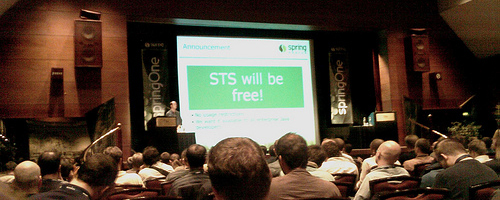
It was April 27th around 2:39pm, when Rod announced in his SpringOne Europe opening keynote:

“STS will be free!"

Reto Meier, with our partner namics, took a picture as proof of that very moment and published it on flickr.com. Also the audience at SpringOne seemed to be enthusiastic about the announcement and as a consequence the word was spread to outside of the conference soon after.

So here we are, since Rod promised it, we can't get out of it… ;-)

Rod @ SpringOne

Today we are proud to deliver on Rod's promise and can announce that the first free versions of STS have been published and can be downloaded from the product page

Using Bundlor in Eclipse

Engineering | March 26, 2009 | ...

In an earlier blog, Ben introduced Bundlor, the concepts behind it and how to use it from the command line as well as from within ANT and Maven. In this post I'll show how Bundlor can be used in an Eclipse environment.

When developing OSGi-based applications, some users don't want to spend time constantly updating their MANIFEST.MF, but instead want to focus on actual business logic in their application components: in such a scenario the Bundlor Eclipse integration will ensure that the MANIFEST.MF file reflects actual dependencies expressed by code artifacts in the project and removes the need to manually manage classpath settings in Eclipse. Additionally BundlorEclipse can help to cleanly separate runtime dependencies from test dependencies by introducing test-only

Spring IDE 2.2.2 and dm Server Tools 1.1.2. released

Releases | March 18, 2009 | ...

Dear Spring community,

I'm pleased to announce that our EPL-licensed Spring IDE and dm Server Tools have been updated.

Both releases are mainly addressing bug fixes and minor improvements. Additionally the dm Server Tools got some new features like Bundle and PAR export as well as tailing of application trace files.

You can install both from our new consolidated Eclipse update site available from http://www.springsource.org/update/e3.4 (please note that this update site does not work with a web browser).

Cheers, Christian Dupuis Lead, Spring IDE & SpringSource Tool Suite

Announcing SpringSource Tool Suite 2.0

Engineering | March 17, 2009 | ...

Today we are pleased to announce the general availability of the 2.0 version of our SpringSource Tool Suite (STS). You can find the press release here.

For the 2.0 iteration we focused on the two major feature areas that we identified based on the great feedback from our customer base and community: provide the best possible environment for Spring-based application development and provide tools to develop enterprise applications based on OSGi and the SpringSource dm Server.

I'd like to use this blog to introduce some of the new Spring development tools of STS 2.0. The new OSGi development tools have already been highlighted in an earlier blog

OSGi Development Tools in STS 2.0

Engineering | March 05, 2009 | ...

Yesterday we published a final release candidate build of the upcoming SpringSource Tool Suite version 2.0. The RC build is available for Windows, Mac OS X and Linux from the STS product page.

STS 2.0 is equipped with new productivity tools for developing Spring applications, like Quick Fixes, as-you-type validation and correction, project and bean creation wizards as well as a Visual Spring Configuration Editor and more. Stay tuned for more information on these new features.

Additionally STS 2.0 comes with tools for OSGi-based application development that experienced as well as new adopters…

Spring IDE 2.2.1 released

Releases | November 30, 2008 | ...

Dear Spring Community,

I'm pleased to announce that we have released Spring IDE 2.2.1. This version is mainly a bugfix and maintenance release but has some significant user level changes as well.

Get more information at the Spring IDE blog

Watch out for more tooling related announcements from SpringOne during the upcoming week.

SpringSource Tool Suite Released

Engineering | March 20, 2008 | ...

This year's EclipseCon was the first that we attended as a company. We had quite a few talks, which were all well received and we announced the beta program for SpringSource Tool Suite. Overall we all had a very great time and we got lots of feedback from the Eclipse community about the projects in the Spring Portfolio and especially what we are doing in the web space. I'll make sure to forward all the feedback to the project leads in the coming weeks. Since EclipseCon is coming to its end today, I finally found time to sit down and write about what we introduced at the conference.

We unveiled the Personal Use Edition of SpringSource Tool Suite (STS) during our BoF on Monday and I have spent a lot of time talking and mailing to people about what extra value it brings. In this blog I will outline the features of the SpringSource Tool Suite in more detail. First of all, I have heard quite a few times that people think that the announcement of the SpringSource Tool Suite means that we will stop improving and shaping Spring IDE. Please let me make the point that this absolutely not the case; actually the opposite is true and already evident by taking a look at the Spring IDE JIRA and Subversion repository. In fact since I joined SpringSource in January, I was able to increase the amount of time that I spent on Spring IDE while working on the tool suite in parallel.

The goal of the SpringSource Tool Suite is to give you the most sophisticated development tools for doing enterprise development with the Spring Portfolio on the Eclipse platform - sounds like marketing slang but that is the mission statement the tools team is committed to. STS certainly builds on top of the proven Spring IDE but it ties deeply into Eclipse Mylyn and already extends both open source tools to bring enterprise level extensions into your IDE. With the effort to provide the best Spring tooling available we already started and continue to add tooling related features, hooks and extension points into the Spring core framework and other Spring projects.

So with the tool suite you finally get all the benefits of Mylyn's Task-Focused User Interface for doing Spring development. You get context management and focusing while working on Spring application blueprints. Additionally we took the Task-Focused UI approach to a new level and introduced a new technology that we named Task-Focused Tutorials. Task-Focused Tutorials extend the Eclipse Cheat Sheet framework and add task-focusing to each step of the tutorial. With a Task-Focused Tutorial a user - someone new to Spring or someone who wants to learn a certain feature or Spring project - will be able to import a running sample application with a single click and start exploring the sample. Each tutorial step will then provide an explanation of a certain aspect of the tutorial and show only those Java and Spring elements that are relevant to understand and explore the explanation.

Task-Focused Tutorials

From the above screenshot you can see how that looks in Eclipse. The tutorial brought the PetClinic sample application into the Eclipse workspace and focused the workspace to show only the @Autowired annotation and how it is applied to application components. On the right side you can see the expanded step that explains how and why you should use the @Autowired annotation. At the very end of the tutorial the user is able to launch the sample application on a bundled Tomcat server that is automatically installed and configured; again just with a single click.

We think that this way of introducing new features and products is a very powerful approach and makes it really easy for people to explore the Spring Portfolio. Everything a developer needs to have and know when getting started is right where it should be: inside the IDE. When you download the Personal Use Edition Beta you will have instant access to around 20 tutorials that have all been created by either project leads or experienced consultants that directly work with clients. Most notable Adrian Colyer took time to create 7 tutorials that introduce OSGi concepts, Equinox and Spring Dynamic Modules. These tutorials are really cool if you want to jump on the OSGi train right now. The tool suite contains a automatic OSGi bundle update/refresh mechanism that finally allows working on applications and get instant redeploy semantics based on the power of the OSGi runtime (have you ever tried that with EJBs; I did).

The next feature I would like to talk about is called Runtime Error Analysis: the SpringSource Tool Suite is able to provide information on how to solve runtime problems by analyzing Java stack traces. To make that happen we created a online knowledge base that is integrated into the suite and which is being queried right inside the Eclipse IDE. The knowledge base is open for everybody using the tool and we even encourage people to contribute their own analyses by using build-in rich editing features. Take a look at the following screenshot.

Runtime Error Analysis

With the tool suite you don't only get support for analyzing runtime errors but also the tool will help to find common pitfalls and Spring best-practice violations. Especially while working on XML bean definition files this feature becomes really handy as it will inform the developer right inside the XML editor that there is something in the file that he/she might want to revise. For example the tool will detect and recommend the usage of bean inheritance under certain circumstances. Also it will recommend the usage of the constantly improving namespace elements instead of using traditional style bean definitions. Here is an example:

Runtime Error Analysis

So lets see what we got:

  • Spring Development Tools
  • Mylyn's Task-Focused User Interface for Java, Resources and Spring application blueprints
  • Task-Focused Tutorials
  • Runtime Error Analysis
  • Best Practice and Architecture Review tools

There are more features that I haven't touched on. Do you see the main theme in this feature line-up? The last three listed features provide invaluable assistance to develop powerful Spring-based applications. Internally we started to use a metaphor for that feature set: Consultant in a Box. With the SpringSource Tool Suite we want to give access to SpringSource knowledge as if you had a consultant sitting next to you!

I would like to encourage everybody to head over to the beta registration page and give the Tool Suite a try. In closing I also want to say thanks to everybody who has already submitted feedback, issues and suggestions. I will get back to all of you as soon as this overwhelming week at EclipseCon has ended.

Spring IDE 2.0.2 released

Releases | December 15, 2007 | ...

Dear Spring Community,

we are pleased to announce that Spring IDE 2.0.2 has been released today. 2.0.2 is basically a bug fix and enhancement release, but finally adds tooling support for missing Spring 2.5 features like <context:* /> and <jms:* /> namespaces and the component scan facility.

Spring IDE 2.0 Logo

Download | Documentation | Changelog

The release is available from our release update site. Spring IDE 2.0.2 is compatible with current milestone builds of upcoming Eclipse 3.4 (aka Eclipse Ganymede).

Get ahead

VMware offers training and certification to turbo-charge your progress.

Learn more

Get support

Tanzu Spring offers support and binaries for OpenJDK™, Spring, and Apache Tomcat® in one simple subscription.

Learn more

Upcoming events

Check out all the upcoming events in the Spring community.

View all